01
Real-time multi-creator capture
A resilient capture engine connects to dozens of creators at once and saves every gift, comment, like, and join the instant it fires — 24/7, whether your browser is open or not.
[ CAPABILITIES ]
Real-time capture, diamond analytics, PK-battle scoring, gifter leaderboards, and full export — built for operators who run rosters, not single streams.
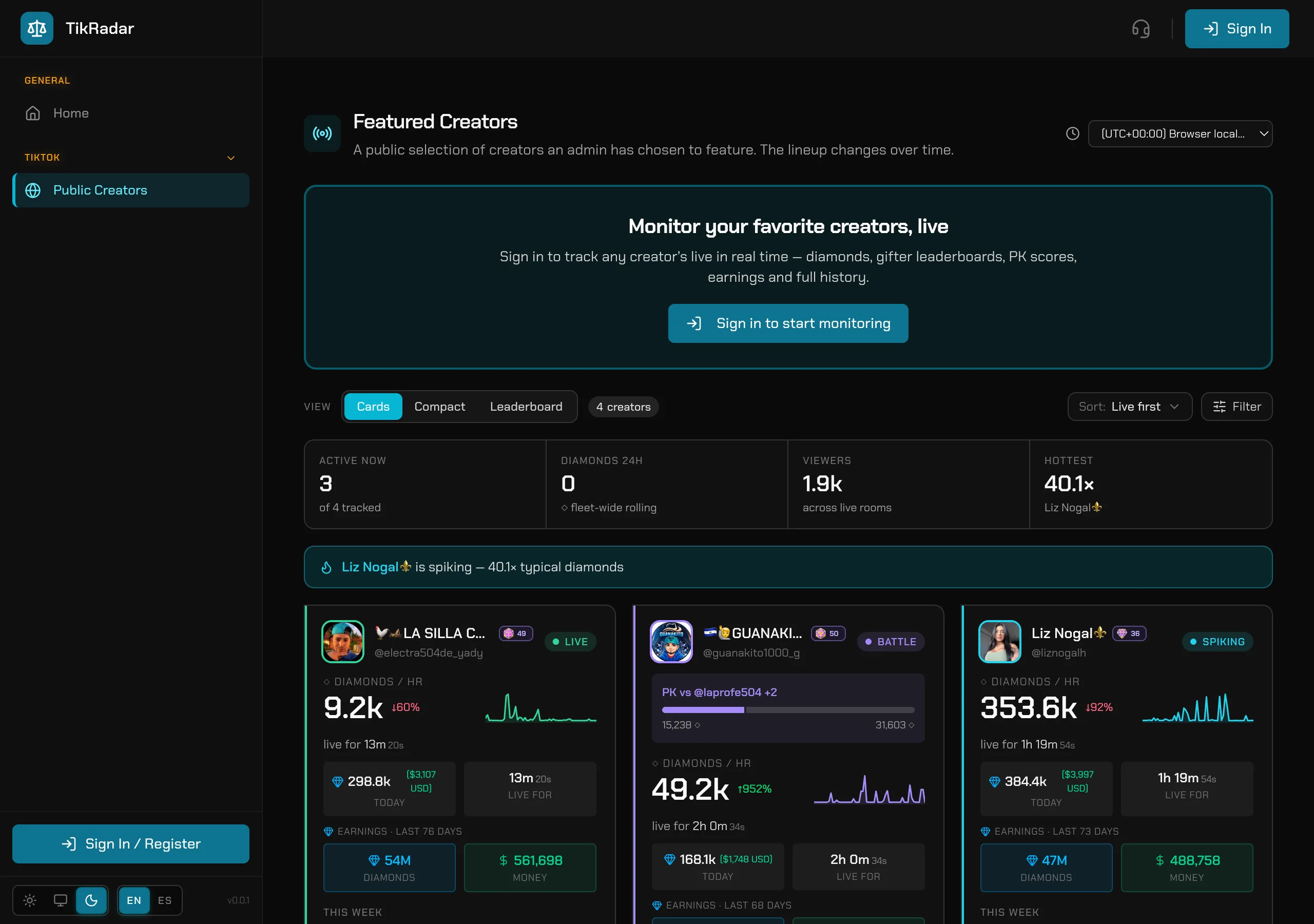
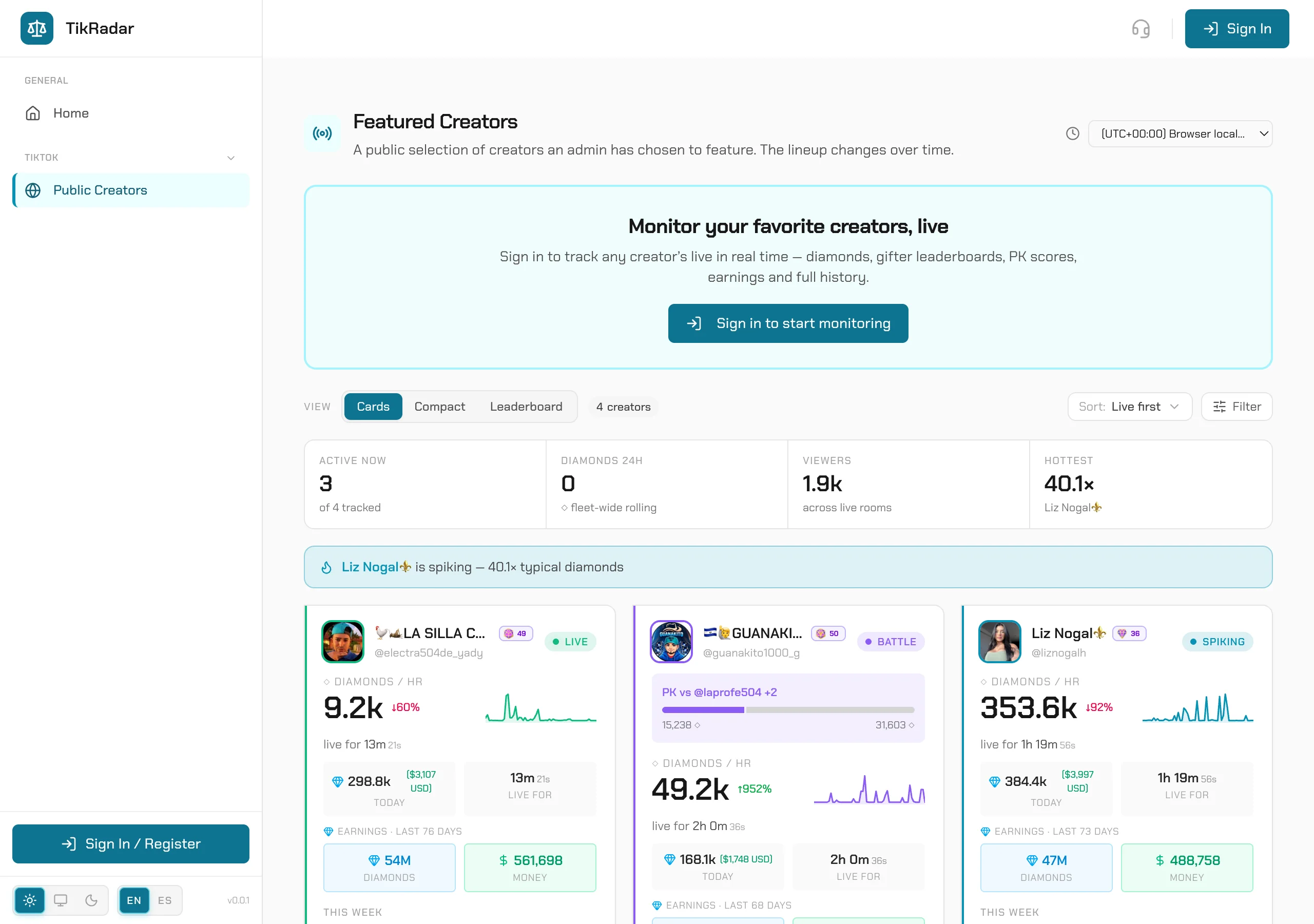
A server-side engine watches every tracked creator and connects the instant they go live — then records the whole broadcast: every gift with its diamond value, every comment, like, join, follow, share, and battle event, streamed into the console over WebSocket as it happens.
Capture runs on our servers. Close the laptop — the session is waiting for you, complete.
The engine detects the live and attaches from the opening seconds — no missed openings.
Gifts, comments, likes, joins, follows, shares, subscriptions, moderator marks, battle state.
Drops, reconnects, restarted battles — sessions stitch into one coherent history.
When your creator enters a PK battle — 1v1 or team — TikRadar scores it in real time: per-side tallies with per-second deltas, the countdown, and the donor roll that shows exactly which whale is tipping the round while it still runs.
Every donor, their PK points, share of the side, and the exact gifts — while the round runs.
Repeated matchups build a rivalry history: wins, losses, scores across every meeting.
2v2 and multi-anchor rounds tracked side by side — not just 1v1.
See a strong opponent? + MONITOR starts tracking them from the battle view.
Untracked opponents are labeled as undercounted — never a fake number.
Diamonds are a score; dollars are a business. TikRadar resolves every captured diamond into gross gifted value and a received-in-cash estimate — over a session, a day, or any range you brush-select — with a per-day calendar that shows exactly which nights paid.
Gross gifted value AND the after-platform-cut estimate — the figure a payout claim needs.
One broadcast, one day, one month, all-time — the math follows your window and timezone.
One toggle flips every card, calendar and leaderboard between diamonds and USD.
The same math holds from pocket-money rooms to 105M-diamond operations.
Every viewer TikRadar has ever seen has a profile: gifting momentum, loyalty concentration, per-day heatmaps, and their trail across every room in the fleet. Leaderboards rank them; real TikTok level badges (1–50) size them at a glance.
Top gifters per broadcast, per day, and all-time — with each supporter’s gift history.
TikTok’s own 1–50 gifter grades with authentic badge art, everywhere a viewer appears.
The whales funding multiple rooms, and shared audiences between any two creators.
Star your VIPs — get an alert the moment one gifts in any tracked room.
Diamonds spike; communities compound. TikRadar tracks the structure behind the money — fan-club growth, the moderator roster, subscribers, new fans per day, and follow/share viral rates — so you can tell a growing room from a lucky night.
New members per day plus diamonds split by fan level — inner circle vs drive-by.
Named rosters with their own diamond totals — know who runs the room.
Follows + shares per live minute — the growth signal a diamond chart can’t show.
Chants vs bots, quantified — with the posters one click away.
Everything captured stays addressable: a calendar of every broadcast, full-text comment search across a creator’s history, a permanent URL for any session, day or range — and public live pages you can hand a client with no login.
One session, one day, a from–to range — each resolves to its own stable URL.
By text or by user, inside one live or across the whole history.
CSV for pipelines, XLSX for client decks, TXT for scripts, PDF for proof.
Every visitor reads the same link in their own timezone, currency view, language and theme.
TikRadar is built for people who run rosters, not single streams: three board views, groups, spike alerts, a notifications center, and a console that renders in your timezone, your currency view, your language, your theme — persistently.
Fold creators into folders — an agency book, one client’s talent — and reorder freely.
The board flags a creator running above their typical diamonds — the hottest room finds you.
A live activity drawer grouped by creator, with unread tracking.
Nine browser-source overlays fed by the same capture — Gift Rain to Fleet Rank.
The whole console and this site, in English and Latin-American Spanish.
Every screenshot on this page is a real capture from the production console — real creators, real diamonds, both themes.
A resilient capture engine connects to dozens of creators at once and saves every gift, comment, like, and join the instant it fires — 24/7, whether your browser is open or not.
Comments, gifts, likes, joins, follows, and shares stream into the console over a live WebSocket — you read the room second by second, from second zero.
Live battle state, per-side donor breakdowns, and a second-by-second score timeline — plus past battles and head-to-head records between the two creators.
Per-creator diamonds received, gift-growth curves, and interactive timelines you brush-zoom to any window — bucketed in your timezone, accurate at scale.
Gross gifted value and received-in-cash estimates over any date range — the diamonds-to-USD math done for you, down to a per-day ledger.
A calendar of every captured broadcast with per-session stats, plus a permanent link for any single session, day, or date range — nothing gets lost.
Ranked top-gifter boards per broadcast, per day, or all-time — who is actually carrying the room, with diamonds and gift history per supporter.
Every viewer gets a profile page: gifting momentum, loyalty concentration, per-day diamond and comment heatmaps, and their history across creators.
Authentic TikTok gifter levels (1–50) rendered with the real badge icons next to every viewer, everywhere they appear in the console.
See which whales fund multiple rooms — shared supporters across your roster, and the gifters in any broadcast who also gift in other creators’ lives.
Star your VIP supporters and get a real-time alert the moment a favorite gifts in any tracked broadcast — with per-favorite notification settings.
A live activity drawer grouped by creator, with unread tracking and a new-since-last-look divider — catch up on every room in one pass.
Search every captured comment by text or user — inside one broadcast or across a creator’s entire history.
Export comments and analytics to CSV, XLSX, TXT, or PDF with filters — your data, your spreadsheet, no lock-in.
Fan-club growth, moderator and subscriber rosters, new fans, and follow/share viral rates — the community behind the diamonds.
Crowd vs paying gifters on a level radar, plus diamonds grouped by TikTok level and fan-club level — see exactly which tier funds the room.
The most-repeated messages in a window, sent 3+ times by 2+ distinct viewers — a clean hype/coordination signal, with the posters one click away.
Organize creators into groups, reorder your grid, and run the whole roster from one screen — built for agencies and managers.
Nine browser-source overlays — Gift Rain, Gift Blast, Whale, Hype, Goal, Likes combos, Crown Chase, VIP Arrival, Fleet Rank — with live preview and transparent background.
Every tracked creator gets a public live page you can hand to a client — real-time scoreboard, no login required.
Pick your timezone, flip diamonds to USD, switch English/Spanish, choose dark or light — and the whole console follows, on every page.